

RV Wi Fi looks simple until a work call depends on it. A campground can advertise Wi Fi, a phone can show three bars, and a speed test can look fast, yet the call can still freeze when it matters. That is the problem many new RV remote workers discover after the first bad Monday.
Sherise Gumbs has traveled through 34 states in her RV while using it as a base for remote tech work. Her experience shows the larger lesson. Reliable RV internet comes from backup plans, careful campsite choices, and knowing what each connection can and cannot do.
Here are 11 things worth knowing before your paycheck depends on campground internet.
1. RV WiFi Needs a Backup Before It Needs More Speed

A fast connection feels great. A second connection can save your workday.
That difference matters in an RV because no internet option works perfectly everywhere. Cellular service can be excellent beside one highway and weak twenty miles later. Satellite may perform well in open desert but struggle beneath thick trees.
THOR Industries has published similar advice from experienced RV remote workers. Andy and Kristen Murphy recommend having several ways to connect because the strongest option changes as the RV moves. They have used cellular service, campground WiFi, and another carrier as backups.
A simple setup can look like this:
| Connection | Best use | Main weakness |
|---|---|---|
| Cellular hotspot | Daily work where cellular coverage is strong | Coverage and hotspot limits |
| Satellite | Remote places with open sky | Trees, power use, plan rules |
| Campground WiFi | Extra connection at a good RV park | Quality is controlled by the campground |
| Second carrier | Backup when the main carrier is weak | Extra monthly cost |
This does not mean every RVer needs four internet bills.
It means a worker should have at least one realistic fallback before parking somewhere for a week of meetings.
The cheapest system that works reliably is better than the fastest system that fails completely twice a month.
2. A Coverage Map Cannot Tell You What Happens Inside the RV

Coverage maps are useful. They are not promises.
The FCC National Broadband Map lets travelers compare reported 4G and 5G mobile coverage from different carriers. That makes it one of the better tools for checking an area before booking a campground.
There is an important catch.
The FCC says its mobile coverage areas represent where someone should be able to connect outdoors or while moving in a vehicle. They do not show indoor coverage. Actual service can also change because of terrain, the device being used, and cell site capacity.
That matters inside an RV.
Metal walls, insulation, trees, hills, campground buildings, and the exact parking position can all affect the final result. A map showing 5G over a campground does not prove that a laptop will have a clean video call from site 47.
Use coverage maps as a filter, not a guarantee.
Before booking a work week:
- Check the FCC mobile map.
- Check your carrier’s map.
- Read recent campground reviews for cellular comments.
- Look at the terrain around the park.
- Keep another connection ready.
Sherise’s RV travels also show why this matters. Remote work does not happen from one fixed desk. The office keeps moving, so the connection must be checked again every time the location changes.
3. Three Signal Bars Can Still Give You a Bad Work Call

Signal bars are comforting because they are easy to read.
They are also a poor way to decide whether an important video meeting will work.
Remote work depends on more than download speed. Upload performance matters when your camera is sending video. Connection stability matters when you are speaking. Delay matters when two people are trying to have a normal conversation.
Google Meet tells users to check both bandwidth and latency when video quality is poor. It also recommends watching performance over time because a stable connection matters for good video calls.
Zoom gives useful numbers for comparison.
| Zoom activity | Recommended connection |
|---|---|
| High quality one person video | About 600 Kbps each direction |
| 720p one person video | About 1.2 Mbps each direction |
| 720p group video | About 2.6 Mbps down and 1.8 Mbps up |
| 1080p group video | About 3.8 Mbps down and 3.0 Mbps up |
| Voice only | About 60 to 80 Kbps |
Source: Zoom’s current system requirements.
The lesson is simple.
Do not test an RV connection by opening one website.
Make a video call. Turn the camera on. Share the screen. Upload a file. Connect to the company VPN.
That is closer to the real workday.
4. Your Unlimited Phone Plan May Have a Hotspot Limit

The word unlimited can create false confidence.
A phone plan may include unlimited phone data while giving the hotspot a separate high speed allowance.
That distinction matters because your laptop normally uses the hotspot portion when it connects through your phone.
Current 2026 plans show how different those allowances can be.
AT&T lists 100 GB of hotspot data per line on Premium 2.0. After that amount, hotspot speed can fall to a maximum of 128 Kbps for the rest of the billing cycle.
Verizon’s current Unlimited Ultimate plan includes up to 200 GB of premium mobile hotspot data before hotspot service continues at 6 Mbps.
T Mobile states that Experience Beyond includes 250 GB of high speed mobile hotspot data, followed by service at lower speeds.
Plans can change, so those numbers should always be checked before switching service.
The larger point does not change.
Read the hotspot rules, not just the plan name.
A remote worker can use plenty of data through:
- Video meetings
- Cloud file syncing
- Large downloads
- Software updates
- Photo and video uploads
- Streaming after work
A plan that looks huge at the start of the month can feel very different after two people spend several days on video calls.
5. Campground WiFi Is a Bonus, Not a Work Guarantee
Campground WiFi is not automatically bad.
Some campgrounds now have very good internet. For example, Meridian East Toomsuba KOA advertises fiber internet and specifically promotes it for virtual meetings and remote work.
But that is exactly why the phrase campground WiFi tells you very little.
One park may have modern fiber service and well placed access points. Another may have a weaker connection stretched across a large property.
The campground also controls the system. You do not.
That makes park WiFi risky as the only connection for a job where missing a meeting has real consequences.
Treat it like an extra source.
If it works well, use it for large downloads, updates, streaming, or regular work. If performance changes when the campground fills, move important tasks back to your private connection.
A good question before booking is not:
“Does the campground have WiFi?”
Ask:
“Can guests make stable video calls from individual campsites?”
Those are very different questions.
Recent reviews can help too. Look for comments from people who mention Zoom, remote work, streaming, or actual speed rather than reviews that simply say “WiFi available.”
6. Starlink Can Be Great Until the Best Campsite Has Trees
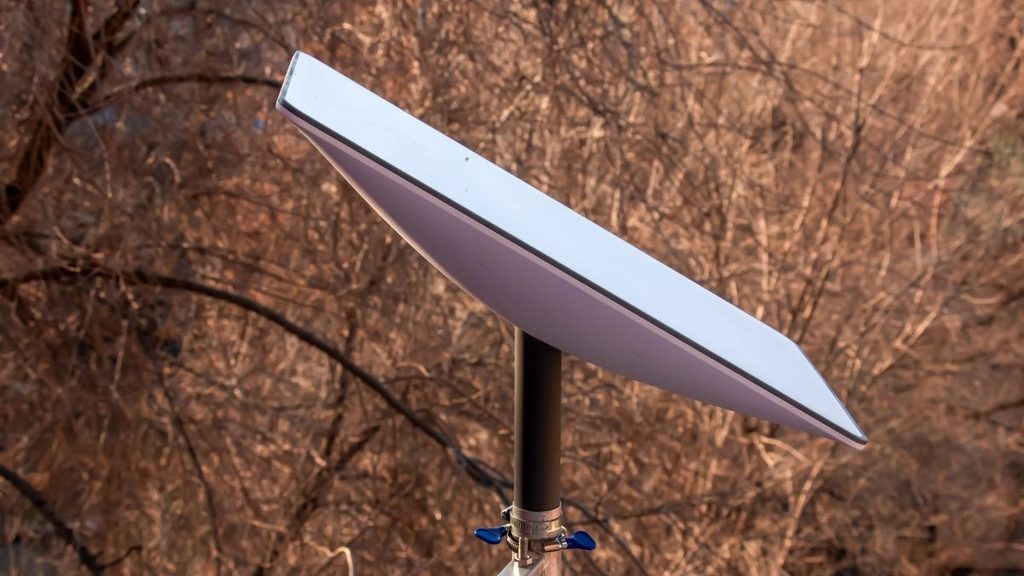
Satellite internet solved a huge problem for RV travelers.
It did not remove the need to think about where the RV is parked.
Starlink says its equipment needs a clear view of the sky for best performance. Trees, roofs, poles, and buildings can cause interruptions and dropped packets. Its app includes a tool that scans the sky for possible obstructions.
This creates a strange RV problem.
The campsite that looks best in photos may be the worst one for satellite internet.
A shady site beneath giant pines can be perfect for summer camping. Those same trees can sit directly in the satellite’s view.
An open gravel site across the campground may have much better connectivity.
That is why cellular and Starlink work well as different types of backup. Trees that bother satellite signals do not automatically remove cellular coverage. A remote desert location with weak cellular service may offer a wide open sky that suits satellite much better.
Before parking for several workdays, use the Starlink obstruction checker at the actual spot where the equipment will sit.
There is also a 2026 plan detail remote workers should check carefully. Starlink’s current legal description states that Roam Unlimited is not permitted for business or enterprise uses. Anyone buying service for paid work should confirm that the selected plan and account terms permit the intended use.
7. Data Disappears Faster When Two People Work From the RV
Email barely feels like internet use.
Hours of video do.
That difference becomes important when two remote workers share the same RV connection.
Zoom recommends several Mbps in each direction for some HD video settings. Multiply that activity across several meetings, then add cloud storage, Slack, browser tabs, uploads, software updates, and the second person’s laptop.
The data allowance can start shrinking much faster than expected.
A simple workday might include:
- Two hours of video meetings.
- Several cloud document sessions.
- A large presentation upload.
- Automatic laptop backup.
- Phone photo syncing.
- A streaming show after dinner.
None of those activities is unusual.
Together, they can make mobile data management part of RV life.
That does not mean workers need to count every megabyte.
A better system is to separate important work from heavy background use.
Pause large operating system updates when cellular data is limited. Schedule photo backups when a better connection is available. Download movies before entering a weak coverage area.
And check the hotspot dashboard before the allowance is nearly gone.
The warning should come from you, not from a slowed connection ten minutes before a meeting.
8. The Best Internet Setup Is Useless When the Batteries Are Low
Home internet normally disappears into an electrical outlet.
RV internet does not.
A router, satellite terminal, laptop, second monitor, phone, and other work gear all need power. That matters much more when the RV is parked away from shore power.
The Starlink Mini shows why internet should be included in the energy plan. Starlink lists average power use of 25 to 40 watts for the Mini, with DC power support.
Twenty five watts does not sound like much until the equipment runs all day.
Add a laptop and monitor and the office becomes one of the RV’s regular electrical loads.
For someone who works from hookups, this may barely matter.
For someone who boondocks for several days, it can affect battery sizing, solar use, generator time, and where work hours fit into the day.
A simple RV work power check
| Device | Question to answer |
|---|---|
| Satellite terminal | How many hours will it run? |
| Cellular router | Does it run from DC power? |
| Laptop | How often does it need charging? |
| Monitor | Is a second screen worth the extra power? |
| Battery bank | Can it support work plus normal RV loads? |
Sherise uses a standing desk and several monitors in her RV office, which shows how close a mobile workspace can become to a normal home office.
The internet plan and power plan should be designed together.
9. A Signal Booster Cannot Create a Tower That Is Not There
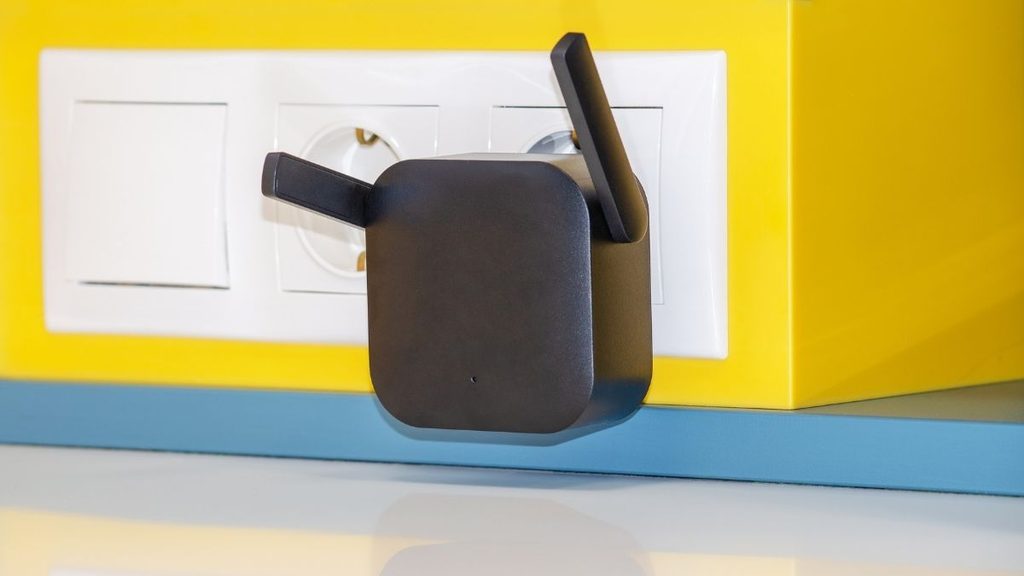
A cellular booster can help in the right place.
It is not magic.
The purpose of a booster is to strengthen an existing cellular signal. If there is no usable carrier signal in the area, the booster has nothing meaningful to improve.
weBoost says this directly in its RV product information. Its RV20 requires some existing signal and cannot create cellular coverage in a complete dead zone.
That makes boosters useful for a specific problem.
Suppose a campsite has a weak signal outside the RV but poor performance inside. An outside antenna and booster may improve the usable connection.
Now consider a boondocking location many miles beyond any useful cellular service.
That is a different problem.
Satellite internet may be the better tool there, assuming there is enough sky access.
This is why buying more equipment without finding the cause of the bad connection can waste money.
Ask one question first:
Is the problem weak existing cellular service, or no cellular service at all?
A booster addresses the first problem.
It does not solve the second.
10. The Campsite Number Can Matter More Than the Campground Name
Remote workers often research the campground.
They should also research the campsite.
Two sites inside the same RV park can give very different results.
One may sit close to a campground WiFi access point. Another may be across the park.
One may have open southern and northern sky. Another may sit beneath mature trees.
One may face a nearby cellular tower with little terrain in between. Another may sit behind a hill or large building.
THOR’s remote work advice notes that service can sometimes change depending on which side of a campground the RV occupies.
Starlink’s guidance makes the same issue clear from the satellite side. Small obstructions can hurt connection quality, so placement matters.
Before choosing a campsite for a heavy work week:
- Look at satellite images.
- Check how dense the tree cover appears.
- Ask which sites have the clearest sky.
- Ask where campground WiFi equipment is located.
- Read reviews for specific site numbers when possible.
- Check cellular coverage for the exact area.
This can feel excessive for a weekend vacation.
It makes much more sense when Tuesday includes a presentation to the boss.
11. Test the Connection Before Monday Morning
The worst time to discover an internet problem is two minutes before work.
A safer RV routine is to treat arrival day as internet test day.
Sherise’s 34 state remote work experience is a good reminder that an RV can function as a serious office. THOR reports that she normally works from about 8 a.m. to 5 p.m. from her RV and has built a dedicated office space around that routine.
A work connection deserves the same preparation.
After parking, run through the tasks that matter most.
The 15 Minute RV WiFi Test
| Test | What you are checking |
|---|---|
| Open work apps | Basic stability |
| Join a video call | Audio and video quality |
| Upload a file | Upload performance |
| Connect to VPN | Employer system access |
| Share your screen | Real meeting performance |
| Switch to backup | Whether plan B actually works |
Do not stop after one speed test.
Google Meet recommends looking at bandwidth and latency over time because stable performance is important during video calls.
Try another test during the hours when you normally work.
A campground may feel fast at 2 p.m. and very different after more guests arrive.
If the connection is poor, solve it before the workweek starts. Move the satellite terminal. Test the second carrier. Ask whether another campsite is available.
The goal is simple.
Monday morning should be boring.
That is a sign the system is working.
The Real Secret to Reliable RV WiFi
Sherise Gumbs proves that an RV can become a real remote office. Her rig has traveled through 34 states while serving as the base for her work in IT and cybersecurity.
But dependable RV WiFi is rarely about buying one perfect device.
It comes from layers. Check cellular coverage before booking. Keep a backup carrier or connection. Give satellite equipment enough sky. Know the hotspot limits. Test the campsite before an important call. And make sure the batteries can support the office for the full workday.
The scenery can stay spontaneous.
Your work connection should be planned.